

User Defined Functions in Pandas With Real Use Cases

Learn how to use user defined functions in Pandas with simple examples, clear code, and real use cases for data processing.

User defined functions in pandas help you handle logic that built-in Pandas tools do not support. Real datasets from different industries follow rules that change from project to project, so you often need your own processing method. A UDF lets you write custom logic and apply it to a column or an entire row. This gives you full control over how each value is handled and allows you to solve problems that standard Pandas operations cannot cover.

User defined functions in pandas


What Is a User Defined Functions in Pandas?

A UDF is a normal Python function. You create it with def and then apply it to a column using apply. It returns a single value for each input value. Pandas passes values from the column to the UDF one by one. You decide the logic, the conditions, the mapping, and the final output. This makes UDFs perfect for tasks where the dataset needs processing that Pandas does not provide out of the box.


Example 1: Calculating Total Marks From Multiple Columns

Assume a CSV file score.csv contains marks for five subjects. You want the total score for each student. Pandas does not have a direct method for this exact CSV, so you sum the columns using iloc.
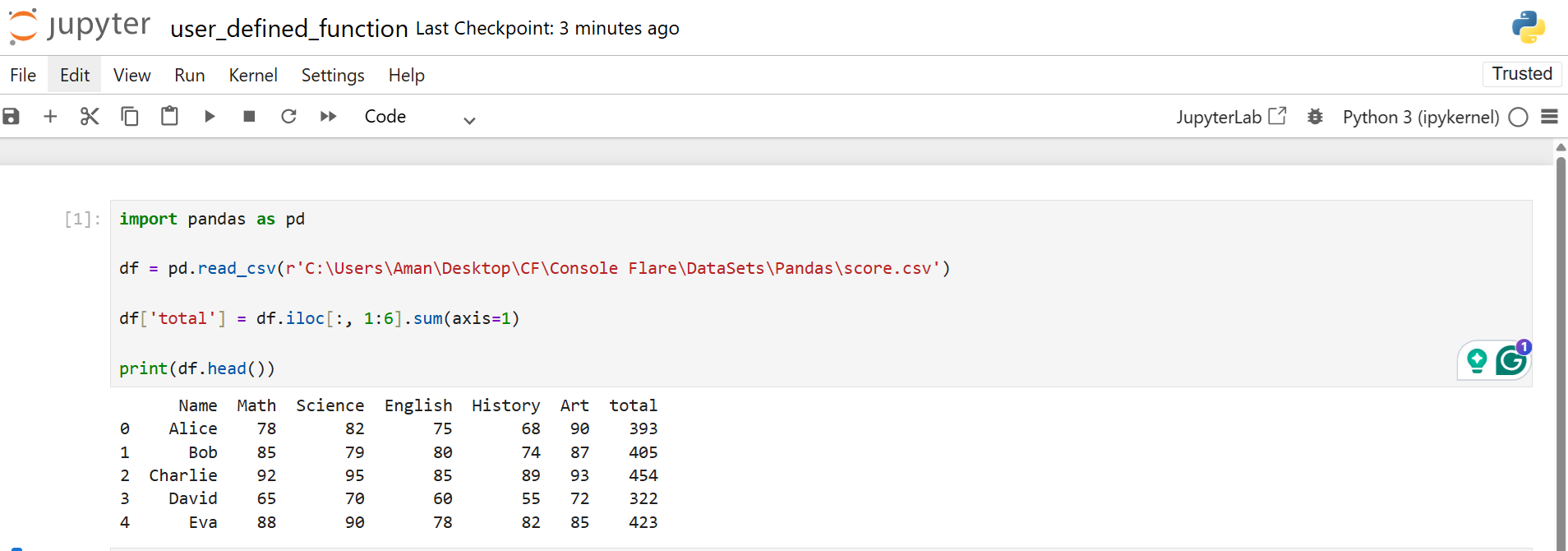
import pandas as pd 

df = pd.read_csv('score.csv') 
df['total'] = df.iloc[:, 1:6].sum(axis=1)

Calculating Total Marks From Multiple Columns

The code reads the CSV, selects columns from index 1 to 5, and sums them across each row. The new column totals the final score.


Example 2: Creating a Grade Column Using a UDF

Now you want to assign grades based on the total. The grading rule is custom, so you write a UDF.
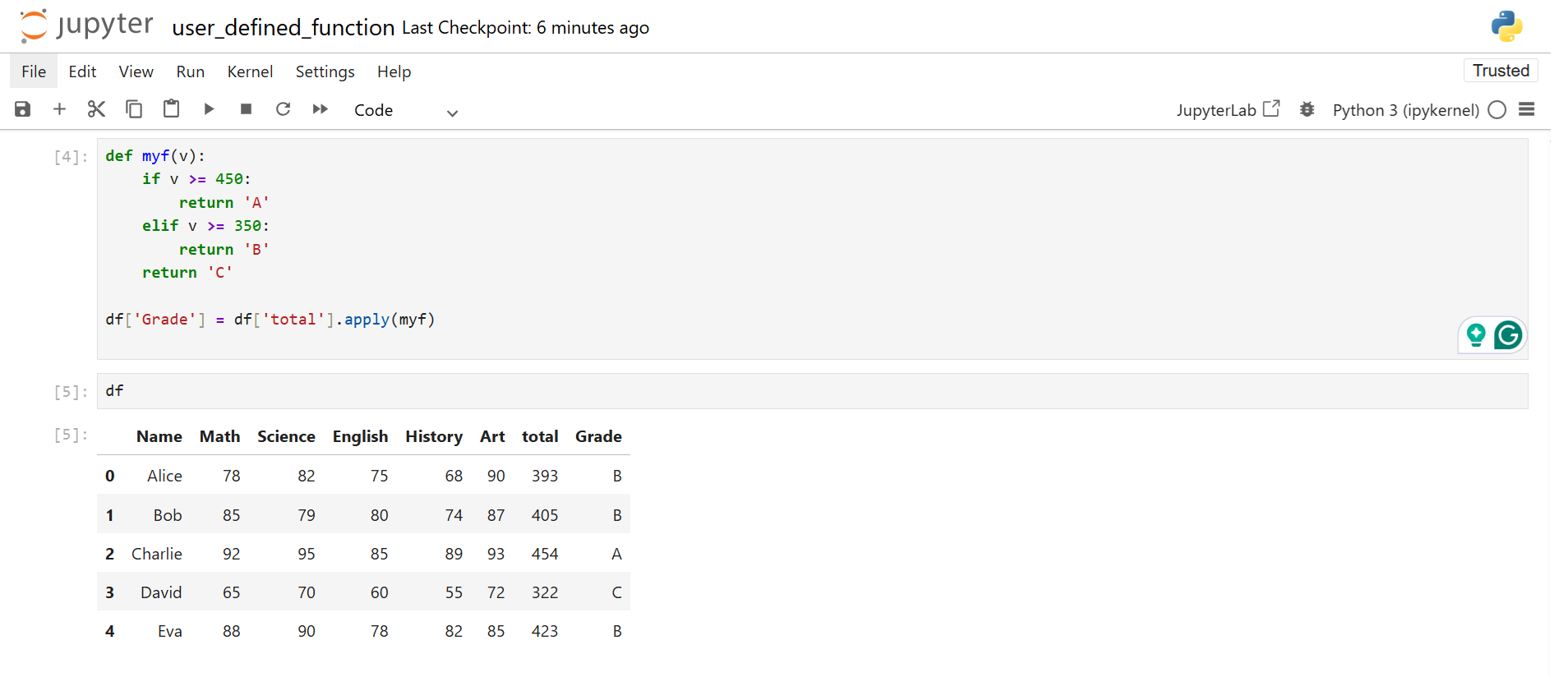
def myf(v):
    if v >= 450: 
       return 'A' 
    elif v >= 350:
         return 'B' 
    return 'C' 

df['Grade'] = df['total'].apply(myf)

Creating a Grade Column Using a User Defined Functions in pandas

The UDF receives a single value at a time. If the value fits a condition, the function returns the grade. apply sends every score from the total column to the UDF and stores the output in Grade.


Use Case 1: Converting Calendar Quarter to Indian Financial Quarter

Companies in India follow a different quarter cycle. The year starts in April, not January. You need to convert normal quarters to Indian quarters.

The CSV expense.csv contains dates and expenses. You convert the date column to a datetime and extract the quarter.
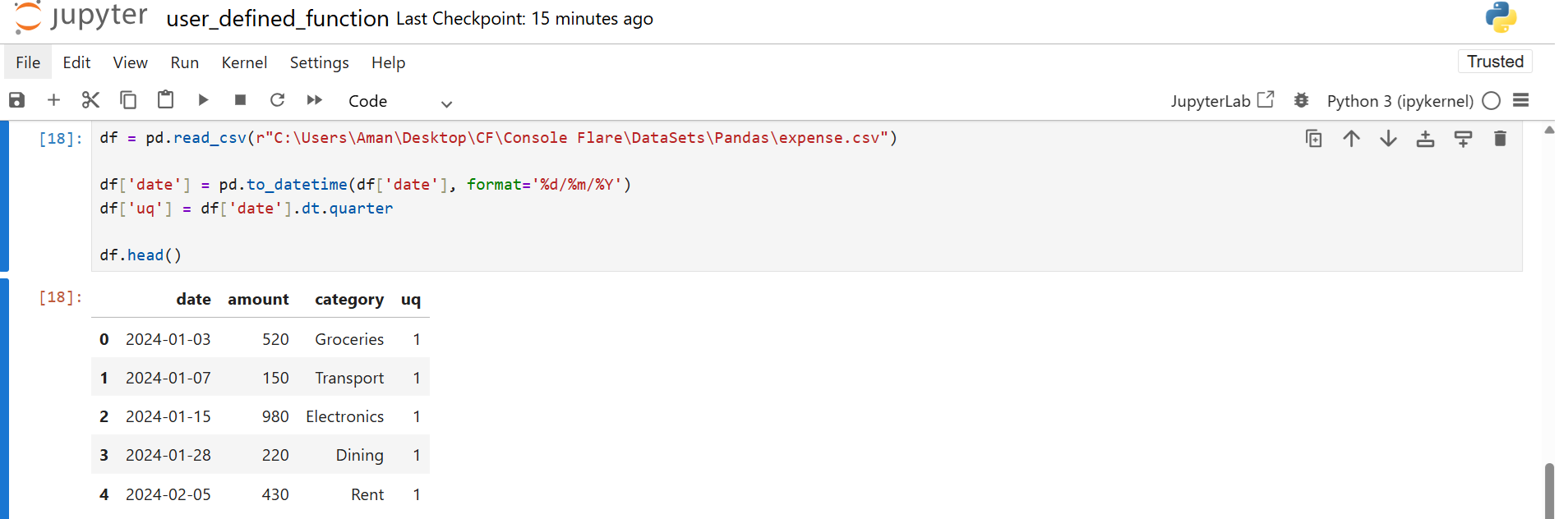
df = pd.read_csv('expense.csv') 

df['date'] = pd.to_datetime(df['date'], format='%d/%m/%Y') 

df['uq'] = df['date'].dt.quarter

Converting Calendar Quarter to Indian Financial Quarter

The extracted quarter is a standard quarter. You convert it into the Indian format using a UDF.

Indian mapping rules:
Quarter 2 becomes Q1
Quarter 3 becomes Q2
Quarter 4 becomes Q3
Quarter 1 becomes Q4
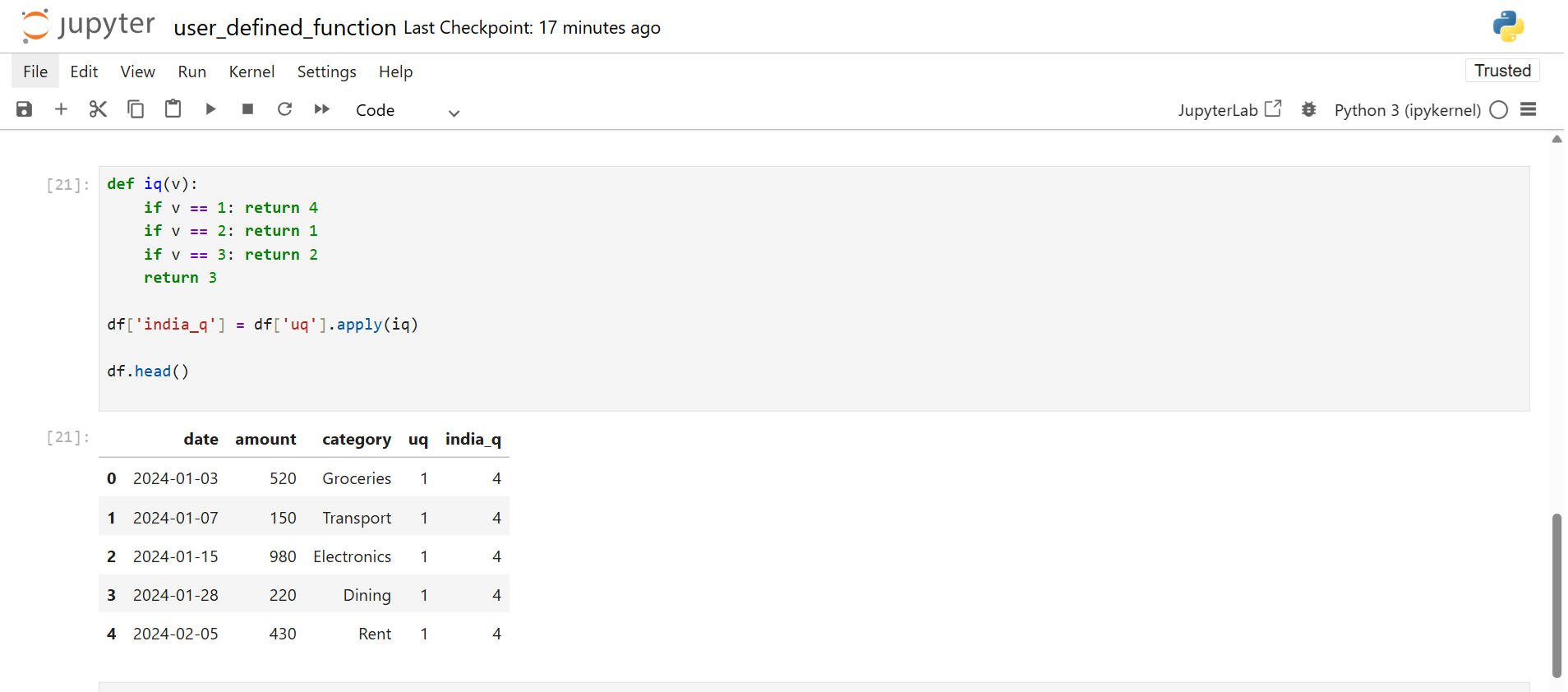
def iq(v): 
    if v == 1: return 4 
    if v == 2: return 1 
    if v == 3: return 2 
    return 3 

df['india_q'] = df['uq'].apply(iq)

User defined functions in pandas

Once you have India_q, you compute which financial quarter had the highest expense.
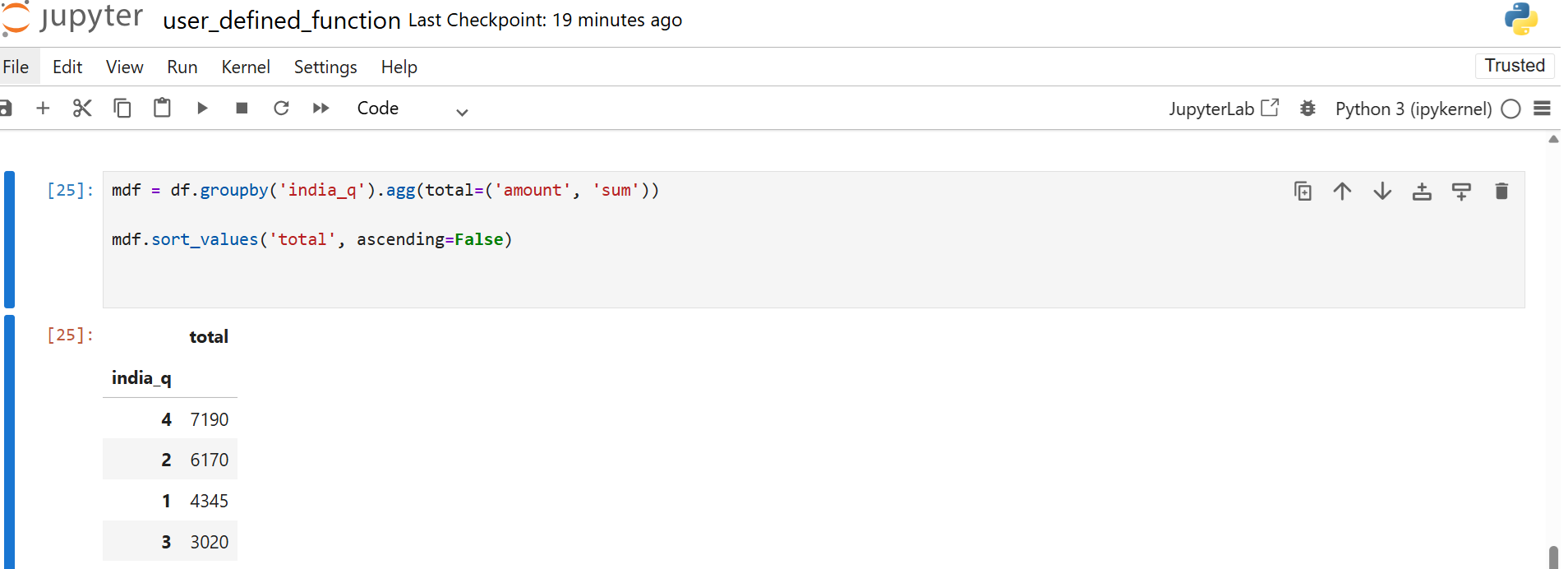
mdf = df.groupby('india_q').agg(total=('amount', 'sum')) 

mdf.sort_values('total', ascending=False)

User defined functions in pandas Code Preview

This gives a sorted view of the total spend in each quarter.


Use Case 2, Grouping Customers by Age Brackets

Question: Which age group purchases from us the most?

Load retail sales data:

df = pd.read_csv('retail_sales_dataset.csv') 

df.head()
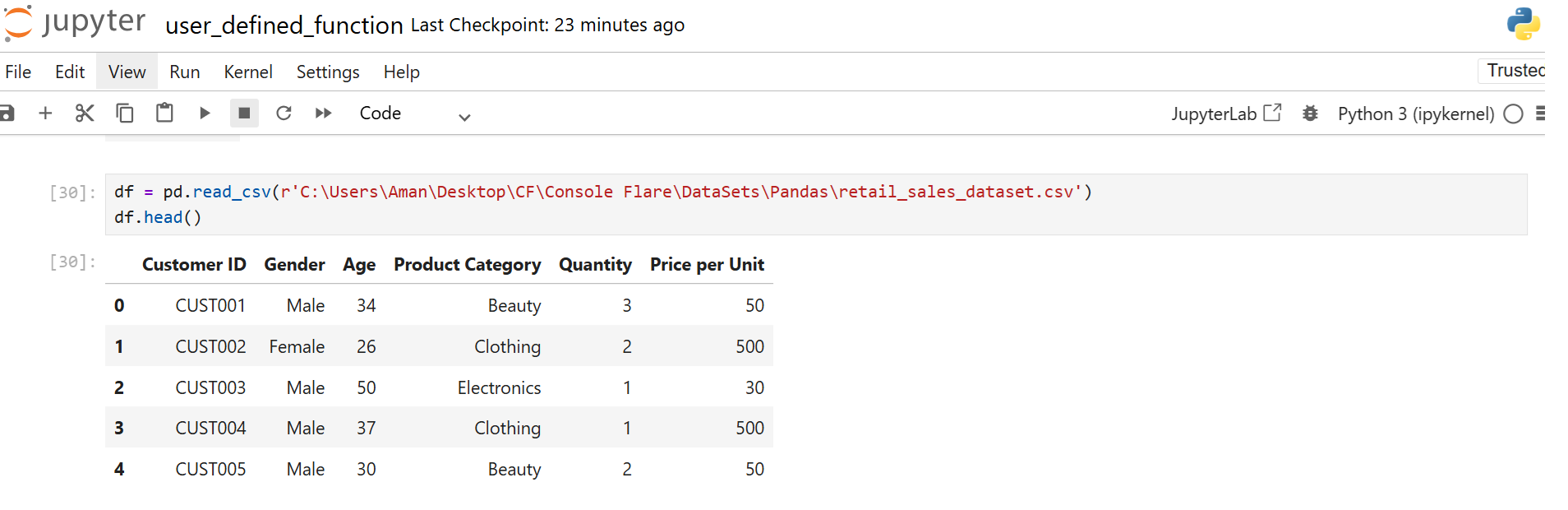
User defined functions in pandas Code Preview

Creating age brackets is common in marketing and analytics. Instead of writing nested conditions each time, you create a UDF to convert any age into a group.

def myf(v): 
    if 0 <= v < 10: return '0-10' 
    if 10 <= v < 20: return '10-20' 
    if 20 <= v < 30: return '20-30' 
    if 30 <= v < 40: return '30-40' 
    if 40 <= v < 50: return '40-50' 
    if 50 <= v < 60: return '50-60' 
    if 60 <= v < 70: return '60-70' 
    if 70 <= v < 80: return '70-80' 
    return '80+' 

df['age group'] = df['Age'].apply(myf)

User defined functions in pandas Code Preview

After converting the ages, you count how many fall into each bracket.
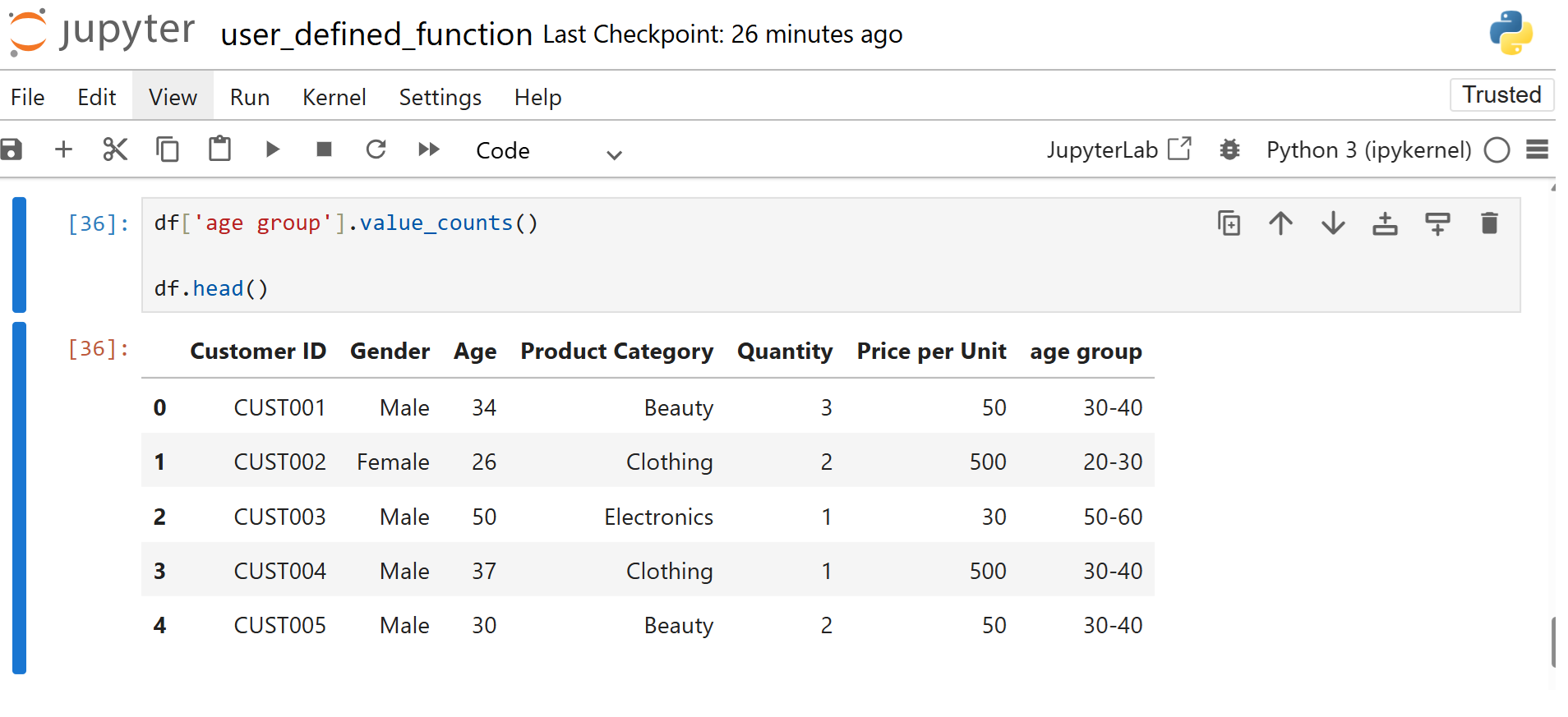
df['age group'].value_counts()

User defined functions in pandas Code Preview

This gives a clear distribution of your customer base.


Using External Libraries Inside a UDF

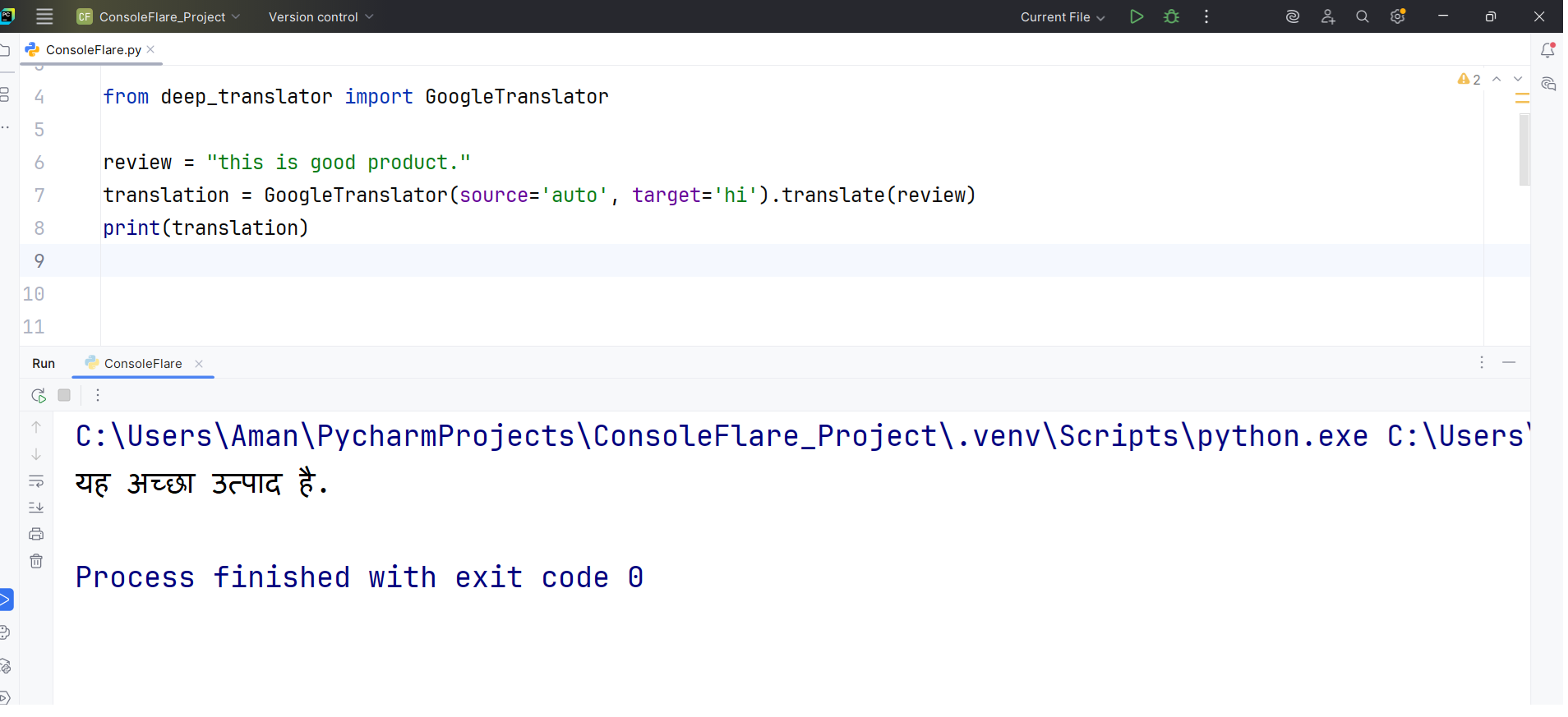
Simple example of conversion with GoogleTranslator:

from deep_translator import GoogleTranslator

review = "this is good product."
translation = GoogleTranslator(source='auto', target='hi').translate(review)
print(translation)
User defined functions in pandas Code Preview

Translation Example

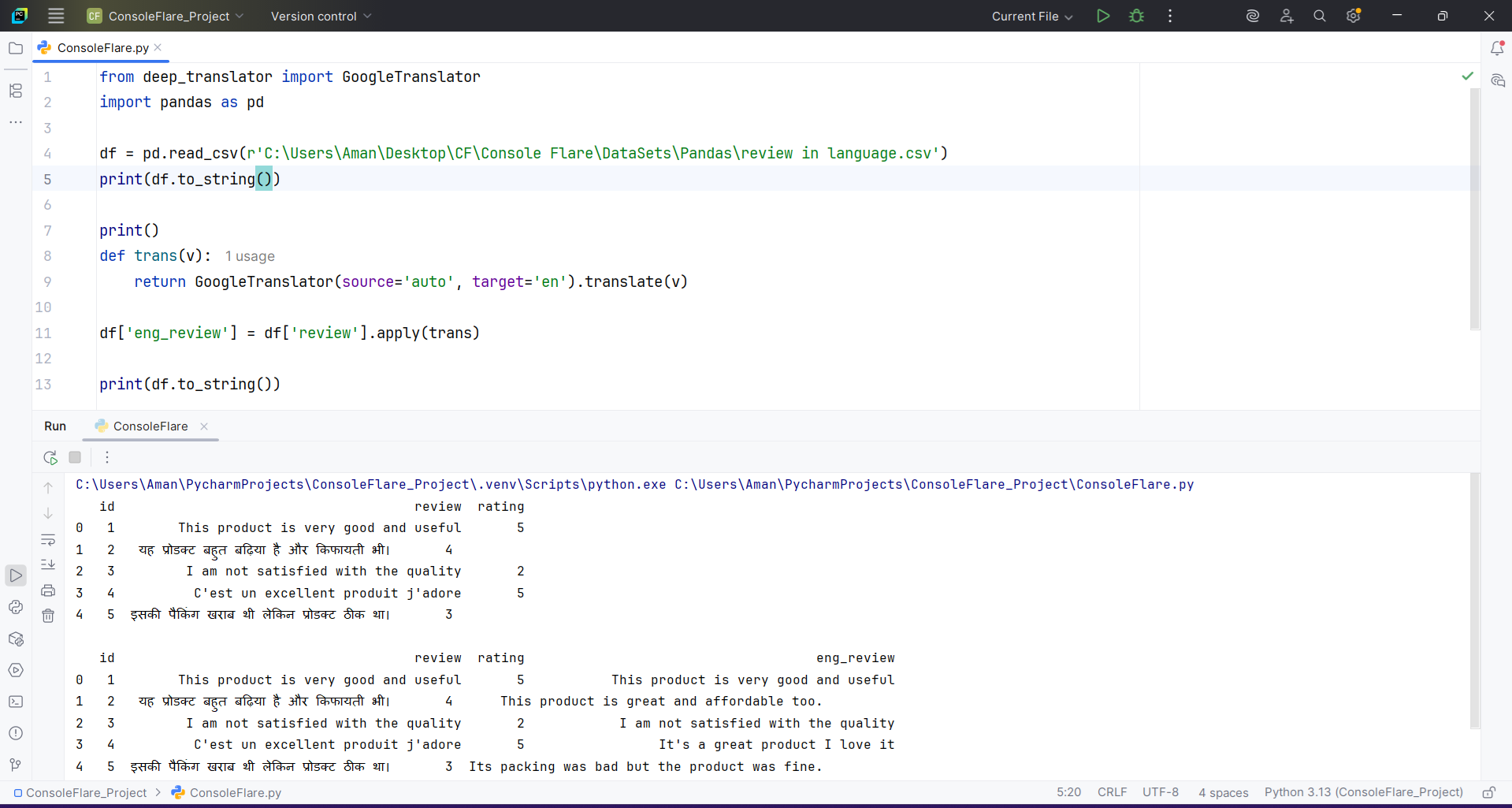
Sometimes you need to translate text from any language to English before analysis. The deep_translator library handles this cleanly. You place the translation inside a UDF because each row needs to be processed individually.
from deep_translator import GoogleTranslator 
df = pd.read_csv('review in language.csv')

def trans(v): 
    return GoogleTranslator(source='auto', target='en').translate(v) 

df['eng_review'] = df['review'].apply(trans)

User defined functions in pandas Code Preview

The UDF receives each review, translates it, and returns English text. The translated column becomes the base for further analysis.


Sentiment Score Using TextBlob UDF

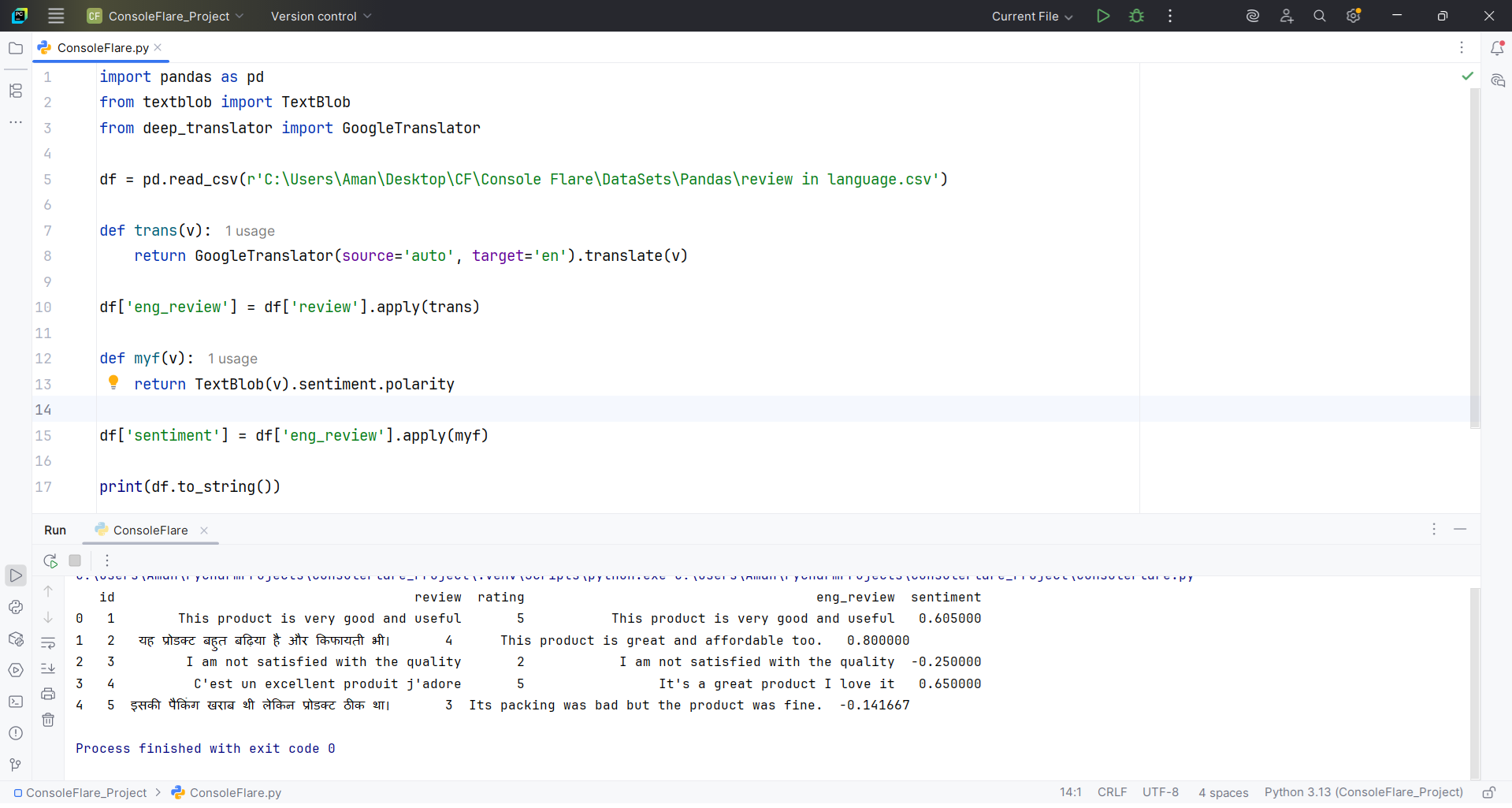
For sentiment analysis, you can use TextBlob. It produces a polarity score between -1 and 1. Again, a UDF is perfect because each review must be processed separately.
from textblob import TextBlob 

def myf(v): 
    return TextBlob(v).sentiment.polarity 

df['sentiment'] = df['eng_review'].apply(myf)

User defined functions in pandas Code Preview

The output tells you whether the statement is negative, neutral, or positive.


Building Business Rules With UDFs

Categorizing Insurance Claims

Insurance claim descriptions come in free text. You build your own rule to classify claims into Theft, Natural Damage, Mechanical Issue, Collision, or Other.

def categorize_claim(description): 
    desc = description.lower() 
    
    if "stolen" in desc or "theft" in desc: 
        return "Theft" 

    if ("hail" in desc or "storm" in desc or 
        "rain" in desc or "flood" in desc): 
        return "Natural Damage" 

    if ("engine" in desc or "overheat" in desc or
        "mechanical" in desc): 
        return "Mechanical Issue" 

    if ("collision" in desc or "rear-ended" in desc or 
        "crash" in desc or "accident" in desc): 
        return "Collision" 

    return "Other"

Apply the rule to the claim description column.

Python:
df['category'] = df['Claim_Description'].apply(categorize_claim)

This produces a structured category for each claim.


Passing Entire Row to a UDF

Calculating a Composite Risk Score

There are cases where you need multiple columns to compute one value. Examples include credit scoring, risk scoring, or pricing models. You need access to the full row, not a single column. In such cases, you use apply with axis=1.

Here is a risk scoring model that uses age, vehicle age, claim history, location, and past accidents.

Python:
def calculate_risk(row): 
    score = 0 

    if row['Customer_Age'] < 25: score += 30 
    elif row['Customer_Age'] <= 40: score += 20 
    else: score += 10 

    if row['Vehicle_Age'] > 10: score += 25 
    elif row['Vehicle_Age'] >= 5: score += 15 
    else: score += 5 

    if row['Claim_History (yrs)'] > 5: score += 25 
    elif row['Claim_History (yrs)'] > 0: score += 15 
 
    if row['Location_Risk'] == 'High': score += 30 
    elif row['Location_Risk'] == 'Medium': score += 15 
    else: score += 5 

    score += row['Accidents_Last_3Y'] * 10 

    return score

Applying this function processes the dataframe row by row.

df['risk score'] = df.apply(calculate_risk, axis=1

The final column risk score becomes a numeric representation of the customer’s risk profile.

For more such content and regular updates, follow us on Facebook, Instagram, LinkedIn


Conclusion

You learned how user defined functions in pandas solve real data problems. They help you build custom rules, process full rows, translate text, score customers, classify claims, and analyse behaviour with clear logic. These examples show how much control you get when you write your own functions instead of depending only on built-in features.

This skill is important in real projects. Companies expect data professionals to handle mixed data, business rules, and custom workflows. Mastering UDFs gives you confidence in cleaning data, preparing datasets, and building strong analysis pipelines.

If you want to grow these skills and build a career in data, ConsoleFlare helps you learn Python, Pandas, NLP, machine learning, and real projects in a structured way. Our mentors guide students, freshers and professionals toward industry roles in a few months with clear teaching and hands-on practice.

Start learning today. Small steps lead to strong results.

To know more, visit www.consoleflare.com.

Console Flare

Leave a Reply

Your email address will not be published. Required fields are marked *

Back To Top